

Hreflang is how you tell search engines which URL is meant for which language or region when the same (or closely equivalent) content exists in multiple places. It does not translate pages, replace rel=canonical, or fix duplicate content by itself. It answers a narrower question: for this topic, which URL should we prefer for French users in France versus English users in the UK?
When hreflang is wrong or incomplete, the symptom is rarely a Search Console banner. The wrong template ranks in the wrong country, or none of the locales build stable relevance because signals conflict. This guide covers how to implement hreflang in HTML, HTTP headers, and XML sitemaps, how x-default fits in, and the mistakes that silently invalidate a cluster. To build tag blocks before deploy, use the Hreflang Tag Generator. To audit live pages, use the Hreflang Checker.

What a hreflang cluster is
A cluster is a set of URLs that are locale alternates of the same content (or the same template type, such as every product detail page). Each URL in the cluster must:
- Reference every other URL in the cluster, including itself (self-reference).
- Use reciprocal links — if page A lists page B, page B must list page A with matching codes.
- Use valid IETF language tags (ISO 639-1 language, optional ISO 3166-1 region —
en-GB, noten-UKoren_GB).
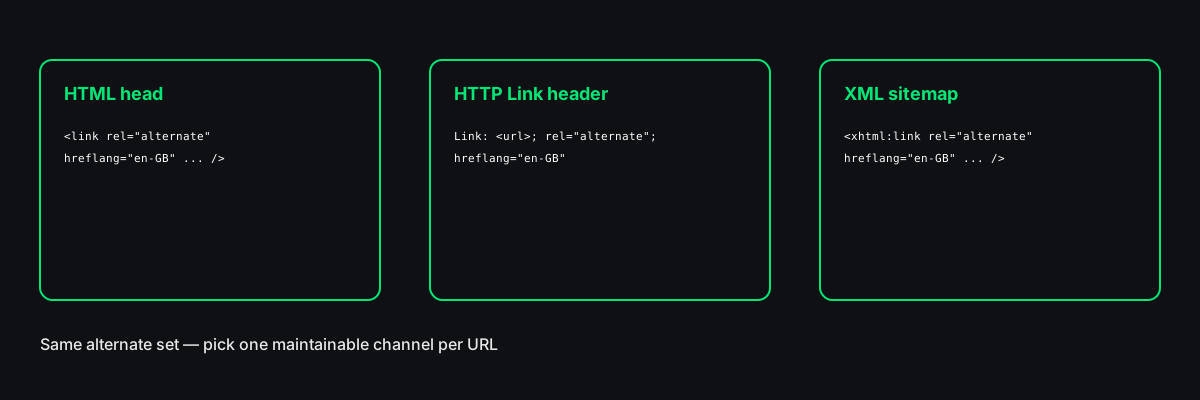
Google documents hreflang as annotations in HTML, HTTP headers, or XML sitemaps. The syntax differs; the logical set must be the same whichever channel you choose.
| Method | Where it lives | Best when |
|--------|----------------|-----------|
| HTML <link rel="alternate" hreflang> | Page <head> | CMS can inject head tags per template |
| HTTP Link header | Response headers | Edge/CDN or server rules manage alternates |
| XML sitemap xhtml:link | Sitemap file | Very large sites, headless stacks, batch generation |
HTML implementation
The familiar form is one line per alternate in the document head:
<link rel="alternate" hreflang="en-US" href="https://example.com/us/product/" />
<link rel="alternate" hreflang="en-GB" href="https://example.com/uk/product/" />
<link rel="alternate" hreflang="fr-FR" href="https://example.com/fr/produit/" />
<link rel="alternate" hreflang="x-default" href="https://example.com/" />
Every localized URL carries the full block, not just “the tags for my language.” The US page includes en-GB and fr-FR lines pointing at the UK and French URLs, plus its own en-US self reference. Teams often paste only two tags and wonder why Search Console never stabilizes — incomplete sets are the default failure mode.
Use absolute URLs with https://. Relative paths (/fr/page) break when crawlers resolve them inconsistently and are invalid in many sitemap exports.
HTTP Link headers
The same alternates can be sent as a Link response header (one header line or several, depending on your server):
Link: <https://example.com/us/product/>; rel="alternate"; hreflang="en-US", <https://example.com/uk/product/>; rel="alternate"; hreflang="en-GB"Headers help when the CMS cannot edit <head> but the CDN or application can attach headers to HTML responses. The cluster rules do not change: full set, self-reference, reciprocity, valid codes.
Do not publish identical alternates in both head and headers unless you intend to and your stack deduplicates. Auditors will flag duplication; pick a primary source of truth.
XML sitemap implementation
For large sites, hreflang in a sitemap keeps thousands of product alternates out of individual templates. Each <url> entry includes <loc> plus xhtml:link children for every alternate:
<url>
  <loc>https://example.com/us/product/</loc>
  <xhtml:link rel="alternate" hreflang="en-US" href="https://example.com/us/product/" />
  <xhtml:link rel="alternate" hreflang="en-GB" href="https://example.com/uk/product/" />
  <xhtml:link rel="alternate" hreflang="x-default" href="https://example.com/" />
</url>
The sitemap namespace must declare xmlns:xhtml="http://www.w3.org/1999/xhtml" on urlset. Each localized URL typically appears as its own <url> block with the same set of xhtml:link lines. Sitemap-only hreflang still requires reciprocity in logic — every loc in the cluster must expose the full alternate set.
Sitemap hreflang does not remove the need for correct canonical tags on each URL. Canonical and hreflang solve different problems; conflicting canonicals can override your intent.
x-default
`x-default` is the fallback hreflang value for users whose language or region does not match any other entry in the cluster. Common choices:
- A language selector page at the site root.
- Your primary commercial market when other locales are add-ons.
- A global English page when country-specific English URLs exist elsewhere.
If you have en-US, en-GB, and fr-FR but no de-DE, German users may still receive one of those URLs from search — x-default nudges the fallback when none of the locale-specific URLs fit. Google recommends including x-default when you use country or language targeting; omitting it is not a hard error, but it is a frequent gap on otherwise careful sites.
Locale codes that pass validation
Hreflang uses IETF BCP 47 tags, not country names or CMS locale IDs:
- Language only:
en,fr,de(valid when you do not need regional splits). - Language + region:
en-GB,es-MX,pt-BR. - Script variants:
zh-Hans,zh-Hant(less common, still valid patterns).
Fix these before deploy:
| Mistake | Correct |
|---------|---------|
| en-UK | en-GB (ISO 3166-1 alpha-2 for United Kingdom is GB) |
| en_GB | en-GB (hyphen, not underscore) |
| GB-en | en-GB (language first, then region) |
| english | en |
| UK alone | Not valid — need a language code |
Google silently ignores malformed codes. You will not always get a Search Console item; rankings drift instead.
Reciprocal links and self-reference
Self-reference: the US product URL must include hreflang="en-US" pointing to itself, not only to other countries.
Return links: the French URL must list the US and UK URLs with the same codes used on those pages. If the US page lists France but the French page omits the US entry, Google treats the cluster as unreliable and may ignore hreflang for the whole group.
This is why spreadsheet planning helps: one row per URL, columns for each locale code, then generate tags programmatically. Manual edits on one template without updating the others break reciprocity within a week.
HTML vs header vs sitemap — choosing
There is no universal winner.
- HTML is easiest to inspect (View Source, crawlers, the Hreflang Checker) and fits most WordPress, Shopify, and static site workflows.
- Headers suit platforms where head injection is fragile but edge workers are available.
- Sitemaps scale when every SKU has thirty locale URLs and template head tags are error-prone.
Very large properties sometimes combine sitemap hreflang for discovery with minimal HTML on key templates — but only with automation and tests, not hand-maintained duplicates.
Whichever you choose, maintain one authoritative set. After launch, spot-check URLs with the Hreflang Checker: it fetches live HTML and tests return links. The generator validates codes and cluster shape before deploy; it cannot see your production CMS caching old head blocks.
Common mistakes beyond syntax
Listing hreflang on non-equivalent pages. Hreflang connects translations or regional variants of the same content. Do not link your homepage cluster to a blog post because both exist in French and English.
Only tagging the “main” language. Every locale URL participates equally in the cluster.
HTTP vs HTTPS or `www` drift. Mixed hosts in one set (https://www.example.com/fr vs https://example.com/en) creates duplicate host signals. Pick a canonical host and match hreflang URLs to it.
Believing hreflang replaces geo-targeting in Search Console. Legacy country targeting in Search Console is largely superseded by hreflang and ccTLDs, but hreflang does not move a .fr domain’s geo signal by itself.
Migrating without rebuilding clusters. Domain moves, path changes, or dropping /en/ prefixes orphan old alternates. Rebuild the spreadsheet, regenerate tags, redirect old locale URLs, then re-check.
Workflow we use
- Inventory equivalent templates (home, category, product, article).
- Build a table — rows are URLs, columns are locale codes, cells are absolute URLs.
- Generate tags with the Hreflang Tag Generator (or your CMS from the same table).
- Deploy to all templates in the cluster the same day when possible.
- Verify each template type with the Hreflang Checker on live URLs.
- Re-run after CMS plugin updates — hreflang plugins are a common source of duplicate or stale tags.
For bulk imports from an existing sheet, CSV columns url, lang-code, group map directly into the generator’s bulk mode so you can fix codes and x-default before copying HTML, headers, or sitemap XML.
Hreflang is tedious because correctness is graph-shaped: every node must point to every other node with consistent labels. Treat it like structured data — generate from data, validate on live URLs, and fix reciprocity before debating subtle ranking theories. The generator prepares the markup; the checker confirms the web server actually serves it.