

llms.txt is a plain-text markdown file at your site root that tells automated readers what your project is called, what it does in one sentence, and which URLs matter most. The format is documented at llmstxt.org. It is not a replacement for robots.txt, sitemaps, or on-page SEO. Think of it as a curated reading list you are willing to stand behind.
This guide explains how to write and fix the file. When you want a live score, broken-link list, and line numbers on a published or draft file, use the llms.txt Validator. That tool page focuses on reading validation output. This page focuses on authoring.
What belongs in llms.txt
Start with exactly one H1 line: # Your Site or Project Name. That title should match how you want the site named in an index, not a marketing slogan stuffed with keywords.
Optional but recommended: a blockquote summary on the next lines: > One sentence about what the site offers. The summary gives parsers a quick context line before they hit link lists. If you skip it, some checkers warn even when the rest is valid.
After the summary, add H2 sections. Each section is a group of related links. Common names are Docs, Blog, Products, or Tools. Under each H2, use markdown list lines:
- [Page title](https://yoursite.com/path): Short note about the pageThe note after the colon is optional. The link label should be human-readable. The URL should be the canonical https address you want cited, not a redirect hop unless you have no choice.
Optional section and llms-full.txt
Some sites add an H2 titled Optional for pages that are useful but not primary: privacy policy, changelog, older docs, or a status page. The name is a convention, not a hard rule in every consumer, but it signals lower priority to humans editing the file.
llms-full.txt is a separate optional file at the root for long-form content: extended docs, full API reference, or large static exports. Many teams publish only llms.txt and skip llms-full.txt until they have a clear use case. If you add it, keep llms.txt as the short map and point to the full file from a link line when needed.
Absolute URLs, duplicates, and canonicals
The spec examples use absolute https:// links. Relative paths such as /docs/start can resolve when the file is served from your domain, but they are harder for offline validators and for readers that fetch the markdown out of context. Prefer absolute URLs that match your canonical tags.
List each important URL once. Repeating the same address in two sections creates duplicate lines that validators flag. If two labels need the same URL, pick one section or merge the labels in prose in your CMS, not in llms.txt.
Before you add a URL, open it in a browser or run a status check. A 301 chain is acceptable if the final URL is stable. A 404 or soft 404 in your index sends crawlers to dead ends and undermines trust in the whole file.
Common mistakes and fixes
HTML instead of text. If /llms.txt returns your SPA shell or a hosting default page, parsers see HTML, not markdown. Fix: upload a real .txt or .md file at the root and confirm Content-Type is text/plain or similar.
Missing H1 or multiple H1 lines. Only one # title is allowed. Extra top-level headings usually come from copying README headings. Merge them into section links or move content to llms-full.txt.
Malformed list lines. Each link line must follow - [label](url) with balanced brackets and parentheses. Bullet lines that are plain URLs or bold text without markdown links fail validation.
Empty sections. An H2 with no following - [ lines is a stub. Remove the heading or add links before publish.
Wrong host in links. Staging URLs, www vs bare domain mismatches, and http:// when the site is HTTPS-only are frequent. Align with your canonical policy.

How to draft without starting from a blank file
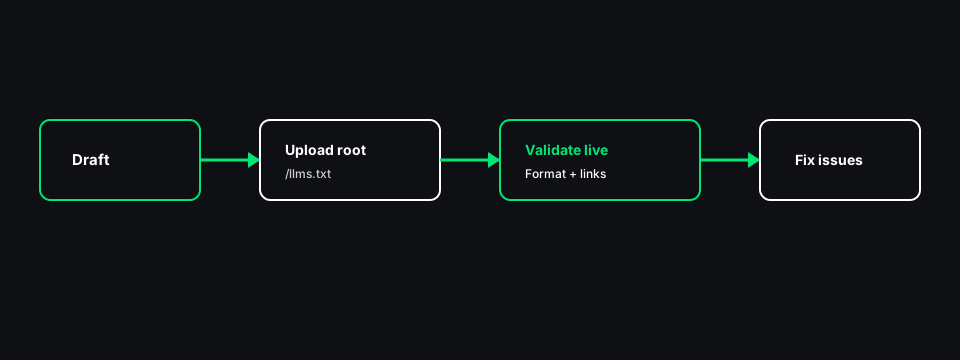
If you already have a sitemap, the llms.txt Generator can pull up to thirty URLs, read titles and meta descriptions, and group links into sections. Treat that output as a first draft. Edit labels, drop thin pages, and rewrite the summary in your voice.
Manual drafting is fine for small sites: write the H1 and summary, add two or three H2 sections, and paste five to fifteen links you would hand to a new teammate. Keep the file short. llms.txt is an index, not a second sitemap with hundreds of lines.
When the draft is ready, paste it into the validator with your site origin filled in so relative links resolve during checks. Fix errors, then upload to the root.
Publishing checklist
- File name is
llms.txtat the web root (same level asrobots.txt). - One H1, blockquote summary present, at least one H2 with markdown links.
- Links use https canonical URLs and return success status.
- Optional section only if you have lower-priority links to segregate.
- Re-run validation on the live URL after upload, not only on the draft.
After publish, run the AI Crawler Accessibility Checker on a key page if you also care about robots.txt rules and on-page signals. llms.txt validation does not prove retrieval bots are allowed; it only checks the index file itself.
Maintaining llms.txt over time
Update llms.txt when you ship a new product area, rebrand, or retire URLs. A stale index is worse than none for human editors who trusted the list. Add a quarterly reminder alongside sitemap reviews.
When you rename sections, keep stable H2 names if external docs already reference them. Changing Docs to Documentation is fine; changing it weekly is not.
If you block AI training crawlers in robots.txt but want answer engines to cite you, remember that training blocks and retrieval access are different policies. llms.txt does not override robots rules. Fix robots.txt for the bots you care about, then keep the index accurate.
What validation does not tell you
A clean validator score does not mean ChatGPT, Claude, or Perplexity cited you yesterday. Adoption varies. The score means your file matches the expected markdown shape and your listed links respond.
Validators that fetch live URLs use timeouts and caps. They may check thirty unique links per run, not every URL in a huge file. Prioritize your most important links in the first sections so they fall under the cap during audits.
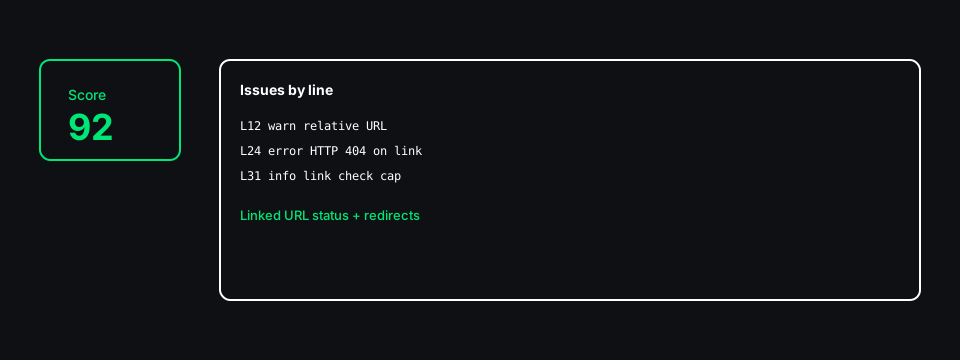
Use the validator after edits and before client handoffs. Use this guide when you need to rewrite sections or explain the format to a teammate who has never published llms.txt before.