

Site owners sometimes discover that Googlebot sees a different page than browsers — a 403 for bots only, a noindex header only on the Googlebot fetch, or a shorter HTML body. Google's URL Inspection tool remains the authority for what Google last crawled. A Googlebot simulator on your own infrastructure is still useful for quick, repeatable checks when you control neither Search Console access nor Google's crawl schedule.
The Googlebot Simulator on Scrawl fetches one URL twice from our servers: Googlebot Smartphone user-agent, then desktop Chrome. It also loads robots.txt on the input origin for Googlebot allow/disallow on the path. You get status codes, redirect chains, X-Robots-Tag, meta robots, canonical, title, meta description, H1s, visible word count, link count, and a highlighted diff. It does not execute JavaScript and does not use Google's IP range.

What user-agent simulation can and cannot do
Can: Reveal whether your origin, CDN, or WAF returns different status codes, headers, or HTML bodies when the User-Agent header changes.
Cannot: Prove how Google ranked or indexed the URL, render client-side React/Vue content, or bypass bot management that keys on IP reputation instead of user-agent alone.
Treat large diffs as investigation prompts, not accusations. Pair with server logs and URL Inspection.
Step-by-step workflow
- Paste the exact URL you care about (include HTTPS and trailing slash if that is what users hit).
- Run the simulator and read the cloaking assessment summary first.
- Open the side-by-side diff — sort mentally by critical rows (status, final URL,
X-Robots-Tag, meta robots). - Check robots.txt allow/disallow for Googlebot on the path.
- If diffs are clean but Search Console disagrees, wait for recrawl or use URL Inspection — Google's last fetch may predate your fix.
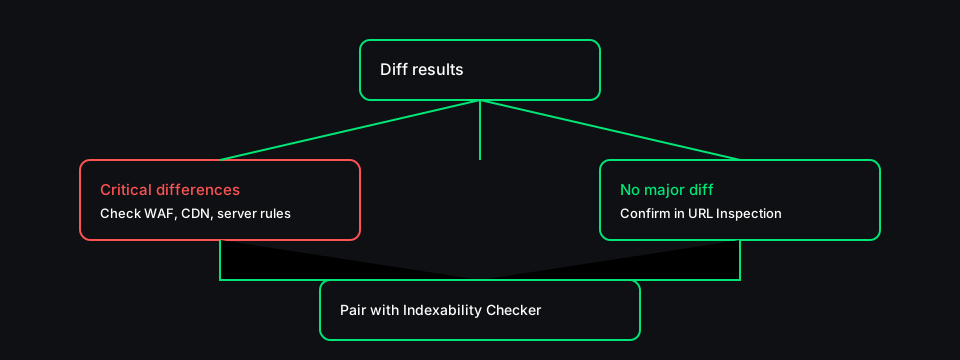
Common causes of user-agent differences
| Pattern | Often means |
|--------|-------------|
| 200 for Chrome, 403 for Googlebot | WAF or bot firewall rule |
| Different noindex in header or meta | Bot-specific cache or edge rule |
| Shorter word count for Googlebot | Separate mobile template or blocked assets in HTML |
| Different canonical | CMS serving variant by device class |
| Same status, different redirect chain | CDN geo or cookie-based routing |
Manual curl checks (illustrative)
Google documents the Googlebot user-agent strings. From a machine allowed to reach your site:
curl -sI -A "Mozilla/5.0 (compatible; Googlebot/2.1; +http://www.google.com/bot.html)" https://www.example.com/page
curl -sI -A "Mozilla/5.0 (Windows NT 10.0; Win64; x64) Chrome/141.0.0.0" https://www.example.com/page
Compare status, Location, and X-Robots-Tag. Scrawl automates the same idea plus HTML parsing.
Run the Googlebot Simulator when you need a fast, logged comparison — then confirm material fixes in Search Console URL Inspection.