
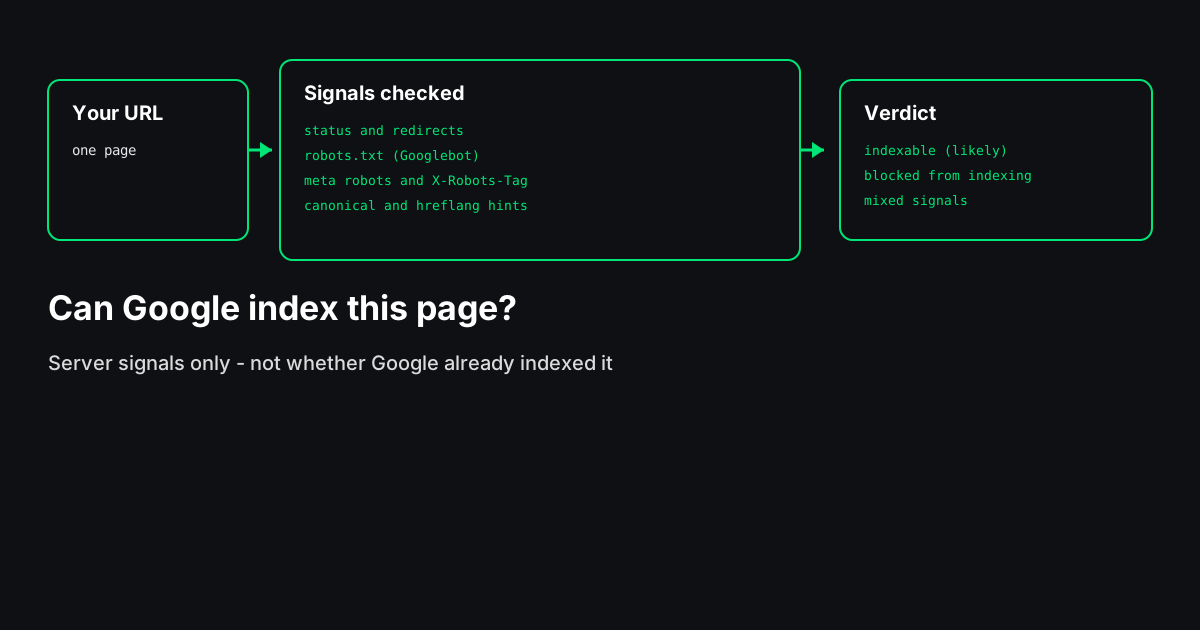
Search Console says "Excluded by noindex" but the live page looks fine in your browser. Or the URL ranks nowhere and you are not sure whether the problem is crawl, index, or content. Indexability is whether a page can be indexed from technical signals. Indexed is whether Google chose to keep it. Crawlable is whether Googlebot is allowed to fetch it. Three different questions.
This guide walks the order a crawler meets signals, the robots.txt versus noindex trap, canonical mistakes, and how to combine URL Inspection with the Indexability Checker. The checker answers can it be indexed from two server fetches. It does not replace the Google Index Checker or the Page indexing report for what Google already did.
!Three steps: fetch page and robots.txt, read indexing signals, output verdict conflicts and fixes
Crawlability vs indexability vs indexed
Crawlability is governed first by HTTP reachability and robots.txt. If Googlebot is disallowed for the path, it may never download HTML to read meta tags.
Indexability adds on-page and header directives: noindex, none, X-Robots-Tag, and status codes like 404/410. A page can be crawlable but carry noindex.
Indexed is Google's decision after crawl. Quality, duplication, and manual actions still matter. A clean indexability report is necessary but not sufficient.
Signals in crawl order
1. Status and redirects
Check the first response and the final URL after redirects. Longer redirect chains can add hops before Google sees the final URL. Final 404/410 tells crawlers the URL is gone. 401/403/429 may be WAF or login walls; automated checks may differ from Googlebot.
Illustrative check:
curl -I -L https://www.example.com/your-page2. robots.txt on the origin
Fetch https://your-host/robots.txt and see whether Googlebot (or * if no Googlebot group) allows the path. Google's robots.txt intro explains that disallow blocks crawling, not necessarily every appearance in results.
The Indexability Checker uses the input origin only. If your URL redirects cross-origin, robots.txt for the destination host is not fetched (no third request).
3. X-Robots-Tag header
Non-HTML files often rely on headers. See MDN X-Robots-Tag and Google's robots meta tag documentation.
curl -sI https://www.example.com/file.pdf | grep -i x-robots4. Meta robots in HTML
curl -s https://www.example.com/page | grep -i 'meta name="robots"'CMS SEO plugins, staging templates, and meta googlebot overrides are common sources. When both robots and googlebot tags exist, the more restrictive combination applies for Googlebot.
5. Canonical link
Canonical is a hint to consolidate duplicates (Google canonical guide). Mistakes include canonical to a redirected URL, canonical to a noindex target, multiple conflicting canonicals, and staging hosts in relative canonicals.
6. Hreflang and alternates
hreflang helps localized versions (localized versions guide). Missing return links are a quality hint, not an automatic index block.
What noindex does and where it hides
noindex asks search engines not to keep the URL in results when they can process the directive (block indexing). It may appear in:
<meta name="robots" content="noindex"><meta name="googlebot" content="noindex">X-Robots-Tag: noindexon the response- CDN or server configs (
add_headerin nginx, Cloudflare rules)
none equals noindex and nofollow together.
The robots.txt versus noindex trap
Before: Disallow: /secret-page in robots.txt and noindex in HTML.
Googlebot cannot crawl to read noindex, so the HTML directive may be ignored. The URL might still appear without snippet if linked elsewhere.
After: Allow: /secret-page (or remove the disallow) and keep noindex until the URL drops from results, or use Search Console removal tools for urgent cases.
The Indexability Checker surfaces this as mixed signals with an explanation. Fix by allowing crawl while keeping noindex, not by adding more disallows.
Worked example (illustrative, ASCII)
Header and HTML both say noindex:
curl -sI https://www.example.com/landing | grep -i x-robots
# x-robots-tag: noindex

curl -s https://www.example.com/landing | grep -i meta | head
# <meta name="robots" content="noindex, follow">
Verdict should be blocked from indexing (likely) while robots.txt still allows crawl.
How to read the tool verdicts
- Indexable (likely) — 2xx HTML, robots allow (or no robots.txt), no effective
noindex/none, canonical self or missing. - Blocked from indexing — Effective
noindex, or robots disallow without contradicting tags, or 404/410. Explanation may note crawl blocked vs snippet-only results. - Mixed signals — Conflicts such as disallow plus visible
noindex, canonical elsewhere, uncertain robots fetch, or 403/5xx responses.
Confidence stays medium or low when robots.txt was truncated or unknown.
Manual checklist
curl -Ifinal status and redirect chain.- Fetch robots.txt; test path for Googlebot.
- View
X-Robots-Tagon HTML and PDFs. - View source for
meta robots/googlebot. - Confirm single canonical to the preferred URL.
- Re-test in Search Console URL Inspection after fixes.
Combine with other Scrawl tools
| Need | Tool |
|------|------|
| Appears indexed? | Google Index Checker |
| Many URLs meta/header | Bulk Meta Robots Checker |
| Canonical only | Canonical Checker |
| Raw headers | HTTP Header Checker |
| Arbitrary robots rules | Robots.txt Tester |
| Missing URL behaviour | Soft 404 Checker |
Honest limits
- No JavaScript rendering — client-only tags are invisible.
- Googlebot and
*only in robots parsing. - One URL per run, not a site audit.
- WAFs may answer Scrawl differently from Googlebot.
- Cannot see Google's index or ranking decisions.
Paste a URL into the Indexability Checker, fix blocking signals, then confirm in URL Inspection. Related tools stay linked at the end of the tool page for deeper checks.
Related tools
Use the Indexability Checker for the live signal report, then branch to specialized tools above as needed.
Fixing signals by type
Remove noindex when the page should rank: check CMS SEO panels, theme <head> partials, reverse proxies, and staging configs left enabled after launch. Clear X-Robots-Tag at the CDN if it overrides HTML.
robots.txt — Use create robots.txt guidance. Narrow disallows to paths you truly do not want crawled. Remember disallow is not deindexing.
Status — Live content should return 200. Retired content should return 404 or 410, not 200 with empty templates.
Canonical — Point to the HTTPS URL you want in results; one tag; avoid chains where canonical targets another redirect.
Hreflang — Add return links between language versions when you rely on hreflang clusters.
When Search Console disagrees with the checker
URL Inspection shows Google's last crawl. Your server may have changed since then. Soft 404 or quality exclusions will not show as noindex. The Page indexing report categorizes reasons at scale.
If Inspection says "Blocked by robots.txt" but the checker shows allow, verify you tested the same host and path (including trailing slash and query strings). robots.txt matchers use path plus query per Google's longest-match rules (robots.txt spec).
HTTP status reference for indexing
Persistent 5xx may cause temporary drop; Google retries (HTTP status codes). Fix server health before rewriting titles.
429 rate limits from your edge can look like indexability problems during audits. Retry from a residential IP or whitelist Search Console inspection fetches separately from bulk tools.
Site-wide "is my website indexable?"
No single URL answers that. Sample templates (home, category, product, article), then use bulk meta robots or a crawler export. The Indexability Checker is for one URL when you already know which page misbehaves.
Staging and launch discipline
Clone production robots.txt carefully. A Disallow: / on staging is correct; copying that file to production without review is a classic launch incident. Run the checker on production URLs after DNS cutover, not only on staging hosts.
Document which environment adds noindex globally so content teams know where previews are safe.