

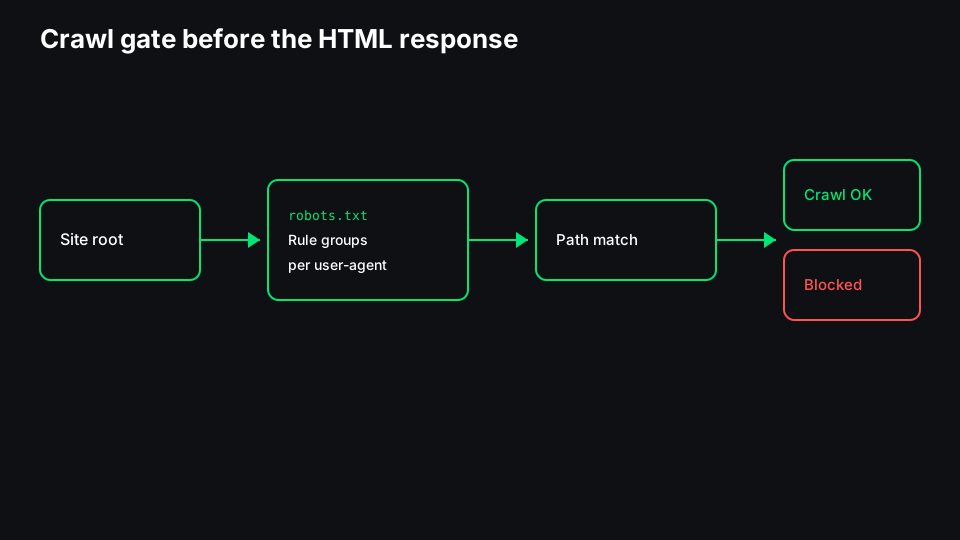
Robots.txt is a plain-text file at your site root that tells crawlers which URL paths they are allowed to fetch. It is a crawl gate, not an index remote. Google may still show a URL in results—sometimes without a description—if other sites link to it, even when robots.txt blocks Googlebot from downloading the page.
That distinction trips up more migrations than bad redirects. Teams Disallow a folder to "hide" staging, then wonder why Search Console still lists those URLs. Or they leave everything crawlable and expect noindex inside blocked HTML to work—it cannot, because Googlebot never sees the tag.
This guide explains how Allow, Disallow, and wildcards match paths, how crawl differs from index, mistakes that look fine in a text editor, how AI crawler user-agents fit in, and a practical testing workflow. When you need to paste a file and probe paths quickly, use the Robots.txt Tester once you know what you are checking.
Crawl vs index (and where robots.txt sits)
Crawling is a bot requesting a URL and receiving a response. Indexing is the search engine deciding whether to store that URL and show it in results. Robots.txt only affects the first step for bots that follow the file.
| Signal | What it controls | Typical location |
|--------|------------------|------------------|
| robots.txt Disallow | Whether the bot may fetch the URL | /robots.txt on the host |
| noindex | Whether the URL should appear in search results | HTML meta or X-Robots-Tag header |
| Canonical | Which URL you prefer indexed when duplicates exist | HTML link or header |
| HTTP 404 / 410 | The URL is gone | Server response |
Google's documentation is explicit: blocking with robots.txt is not a substitute for noindex if your goal is to remove URLs from search. If you Disallow a URL, Googlebot may not crawl it, so it may never see a noindex directive on that URL. The URL can still appear as a "forgotten" result with no snippet.
For pages you want indexed, robots.txt should allow fetch (unless you have a deliberate reason not to). For pages you do not want in search, use noindex on a crawlable URL, or remove the page and return a proper not-found status.
How Allow, Disallow, and user-agent groups work
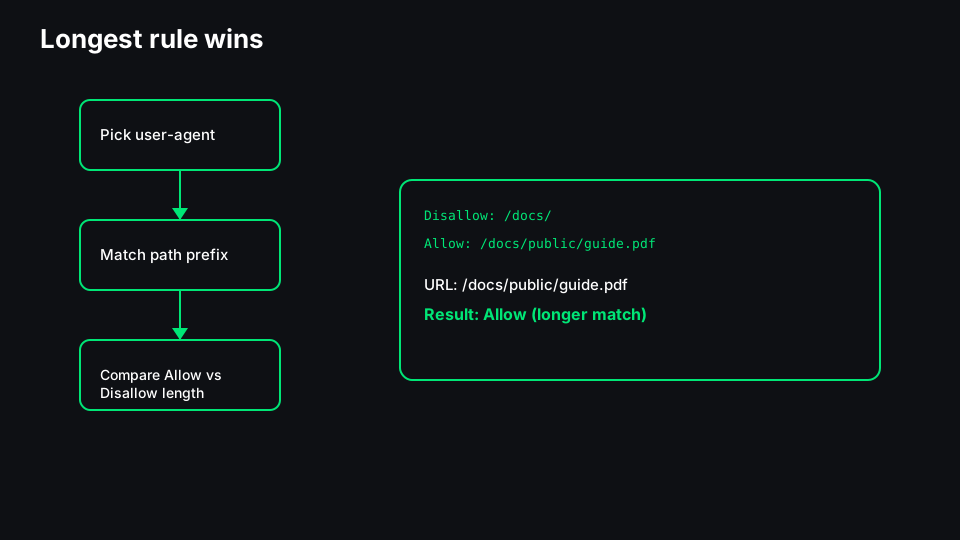
Robots.txt is line-based. A User-agent line starts a group; following Allow and Disallow lines apply to that bot until the next User-agent.
User-agent: Googlebot
Disallow: /private/
Allow: /private/report.pdf

User-agent: *
Disallow: /admin/
Path matching uses the path part of the URL (no scheme or host). A rule of Disallow: /blog blocks /blog and /blog/post-1 because matching is prefix-based unless you use $.
Allow vs Disallow in one group: When both match, the longer matching rule wins. That is how you unblock one file inside a blocked directory.
User-agent: is the fallback group for bots that do not have their own block. Named agents—`Googlebot`, `Bingbot`, `GPTBot`, and others—only read their group plus the `` group depending on the crawler's implementation. Do not assume one Disallow line blocks every bot on the internet.
Crawl-delay and nonstandard directives appear in the wild. Google ignores Crawl-delay. Stick to Allow, Disallow, and Sitemap lines that major search docs recognize unless you know a specific bot reads something else.
Wildcards: * and $
Google's robots.txt specification adds:
- *``** (asterisk) — matches any sequence of characters in a path.
- `$` (dollar sign) — anchors the match to the end of the path.
Examples:
Disallow: /*.pdf$blocks paths ending in.pdf.Disallow: /search/*blocks everything under/search/.
Wildcards are easy to overfit. Disallow: /*? does not mean what people think on every server. Prefer clear prefix rules for critical folders (/cart/, /account/) and test fuzzy patterns against real URLs.
The noindex misconception
Three patterns cause repeat incidents:
- "We'll Disallow it so it drops out of Google." Disallow reduces crawling; it does not tell Google to drop the URL. Use noindex (visible to Googlebot) or take the URL down.
- "We'll noindex everything in robots.txt." robots.txt does not support noindex. The directive lives in HTML or response headers on pages Googlebot can reach.
- Blocking CSS/JS to save crawl budget. Google renders pages with external resources. Blocking assets can make soft errors in rendering and confuse audits, for little real budget gain on most sites.
The fix is ordered: decide index intent first (keep, consolidate, or remove), then set crawl rules that let Googlebot see the tags and content you need it to see.
Common robots.txt mistakes
- Trailing slash drift.
Disallow: /apiandDisallow: /api/are different matches. Align with how your framework generates paths. - Staging copied to production. A full-site
Disallow: /from staging ships to the live host. Always diff robots.txt in release checklists. - Multiple robots files on subdomains.
blog.example.comhas its own robots.txt. The www host does not control it. - Sitemap URLs pointing at blocked paths. Listing URLs in a sitemap while Disallowing them sends mixed signals. Align sitemap entries with Allow rules.
- Blocking query parameters incorrectly. Rules apply to paths, not query strings. Parameter handling belongs in canonicals, redirects, or Search Console parameter tools—not a naive
Disallow: /*?. - Forgetting AI bots. Marketing adds
Disallow: /forGPTBotwhile leaving*wide open, or the reverse—blocking training crawlers but not the user-agent their vendor actually uses. Check each vendor's documented token.
AI crawler user-agents
Bots that power AI products often identify themselves with a dedicated User-agent string. Site owners sometimes add groups such as:
User-agent: GPTBot
Disallow: /

User-agent: Google-Extended
Disallow: /
Google-Extended is separate from Googlebot. Blocking Google-Extended limits use in some Google AI surfaces; it does not block normal search crawling—that uses Googlebot's group.
OpenAI, Anthropic, Perplexity, and others publish bot names and documentation pages. Tokens change; verify the current string before you paste a rule. Remember that robots.txt is voluntary. Malicious scrapers ignore it. For sensitive content, use authentication, not a text file.
If your policy is "allow search, limit AI training," mirror that in separate User-agent lines and review server logs occasionally to see which bots still hit blocked paths.
Testing workflow before and after changes
- Copy the live file from
https://yoursite.com/robots.txt(or your CDN's robots endpoint). Edit in version control, not only in a CMS textarea without history. - List URLs that must stay crawlable—home, money pages, product feeds, key APIs used for rendering—and URLs that must not be crawled.
- Run path checks against the draft file. A tester should report which rule matched and whether the path is allowed for the user-agent you select. The Robots.txt Tester is built for that paste-and-probe loop on Scrawl.
- Deploy and request a fresh fetch in Search Console's robots report.
- URL Inspection on two or three critical templates. Confirm "Crawl allowed" and that Googlebot can load the page if you rely on noindex or canonical there.
- Re-check after template changes—new
/api/routes, headless frontends, and locale prefixes (/es/) often need new Allow lines.
When robots.txt is the wrong tool
Use authentication for private areas, not Disallow alone. Use noindex for low-value indexable URLs you still want crawled for link discovery. Use 404/410 for removed content. Use canonicals for duplicates.
Robots.txt shines for large, intentional crawl savings—faceted navigation shells, infinite calendar archives, internal search result pages—not for fixing index bloat by blocking everything and hoping.
Keep the file boring: a few precise Disallow lines, explicit Allow exceptions where needed, and a Sitemap: line pointing at your real sitemap index. Boring files break less often than clever wildcard puzzles.