
You fixed internal links, submitted the sitemap, and Search Console still shows URLs that should not exist. Sometimes the problem is not the link — it is what your server returns when a URL is missing. A proper 404 or 410 tells crawlers the page is gone. A soft 404 looks like an error to humans or algorithms but sends the wrong HTTP signal — usually 200 OK with thin "not found" copy, or a redirect to the home page.
Google's crawling documentation groups these under HTTP status and network issues and describes soft 404s as pages that return success codes while behaving like errors. You can monitor indexing reasons in Search Console; this guide focuses on server behaviour you control.
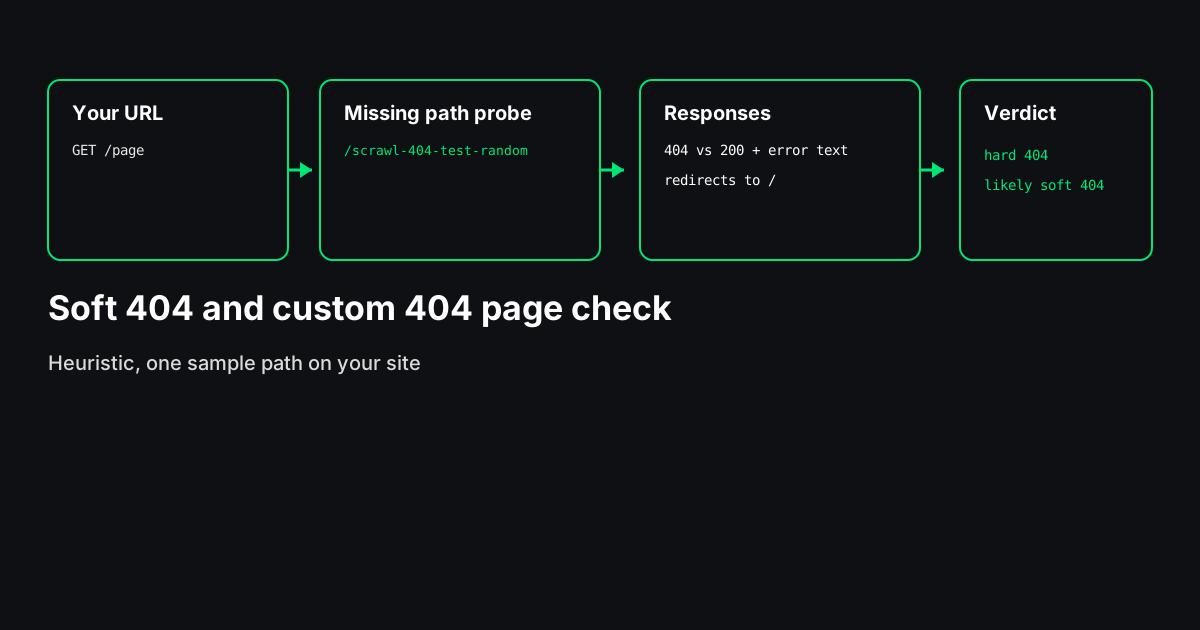
The Soft 404 Checker fetches your URL and one random missing path on the same origin, then compares status codes, redirects, titles, and visible text. It is a heuristic, one-sample test — not a copy of Google's Page indexing report.
!Three steps: fetch two URLs, compare status and content, output verdict and fixes
What a real 404 and 410 look like
404 Not Found means the server has no representation for that URL right now. 410 Gone means the resource was removed intentionally and is not expected to return. Both are valid ways to drop dead URLs from crawl queues when used consistently.
A good missing-URL response:
curl -I https://www.example.com/this-path-does-not-existExpected shape:
HTTP/2 404
content-type: text/html; charset=utf-8
The body can be a helpful HTML page with navigation — the critical part is the status line, not the design.
What a soft 404 looks like in practice
Common patterns:
- Error template with HTTP 200 — Title says "Page not found" but the status is 200.
- Redirect missing URLs to / — Users land on the homepage; crawlers may treat it as a soft 404.
- Thin empty shells — Category, search, or out-of-stock views with almost no unique content and 200.
- Client-side SPAs — The shell returns 200; "Not found" renders only after JavaScript runs (raw HTML checks will not see the client view).
Example of a soft pattern (status wrong):
HTTP/2 200
content-type: text/html
Body still says "404 - page not found". Crawlers that trust the status code may keep trying to index the URL.
Google's HTTP status troubleshooting guide explains why correct codes matter for crawling; use it as the canonical reference when you explain fixes to developers.
Why soft 404s matter (without hype)
Soft 404s can spend crawl budget on URLs that should not exist, may send misleading signals about whether content is available, and often create a poor user experience when people share dead links. The impact varies by site size and link graph; treat this as hygiene on large and medium sites, especially after migrations.
How to find soft 404s
Search Console — Use the Page indexing report and filtering for "Soft 404" or "Not found" reasons where available. That view reflects Google's classification, not your server's intent alone.
Manual curl or devtools — Pick a nonsense path, check the first response status (watch redirects).
Server-level probe — The Soft 404 Checker automates a second fetch to /scrawl-404-test-<random> on your origin so you do not have to guess a path. Verdicts are labelled likely; confirm important templates manually.
Pair with:
- Broken Link Checker for links on a page (the
/tools/404-checkershortcut redirects there). - Bulk Status Checker for lists from Search Console or sitemaps.
- HTTP Header Checker when you need raw headers on a specific URL.
Fixes by stack (illustrative examples)
Node / Next.js
Return a not-found boundary with a real 404 status:
// app/not-found.js — Next.js serves this with 404
export default function NotFound() {
  return <main><h1>Page not found</h1></main>;
}
In Express, set the status explicitly:
app.use((req, res) => {
  res.status(404).send("Not found");
});
nginx
error_page 404 /404.html;
location = /404.html {
  internal;
}
Ensure the error handler returns 404, not 200 with a static file misconfigured.
Apache
ErrorDocument 404 /errors/404.htmlWordPress
Use a 404.php template in the theme; avoid plugins that force 200 on error routes.
Before: missing URL returns 200 with theme message. After: same HTML feel, but status(404) or platform equivalent.
Redirect vs 404 decision guide
| Situation | Prefer |
|-----------|--------|
| Content moved to a new URL with the same intent | 301/308 to the new URL |
| Content deleted with no replacement | 404 or 410 |
| Typo URLs you never marketed | 404 |
| Entire section removed | 404/410 for section URLs; redirect only individual pages with true equivalents |
Do not 301 unrelated URLs to the homepage.
What a good custom 404 page includes
- Clear statement that the page is missing
- Site search or prominent navigation
- Links to top sections
- Consistent branding
You usually do not need noindex on a proper 404 response — the status already signals removal. Avoid noindex on a 200 error template as a workaround.
E-commerce, faceted search, and migration traps
Out-of-stock product URLs are a frequent soft-404 source. Some platforms return 200 with "product unavailable" and no strong canonical to a parent category. Decide deliberately: keep the URL with honest availability messaging and a proper status policy, redirect to a close substitute with 301, or return 404/410 when the SKU is retired. There is no universal rule — but 200 on a dead SKU with boilerplate text is exactly the pattern crawlers struggle with.
Faceted or empty search result pages deserve the same discipline. If a filter combination returns no products, avoid an infinite set of thin 200 URLs. Use noindex on true search result pages if your platform requires it, but do not use noindex on a 200 global error template instead of fixing the status code on missing routes.
During migrations, teams often add catch-all redirects "just in case." A single hop to the right destination is fine; a blanket homepage redirect for unknown legacy paths is not. After cutover, export legacy URLs, run them through Bulk Status Checker, and spot-check edge templates (blog tags, old query-string URLs, PDF paths) with curl. The Soft 404 Checker is a fast sanity check on the default missing-path behaviour of the new stack.
Manual checklist after you deploy fixes
curl -Ion three random missing paths — all 404 or 410?- Re-run the Soft 404 Checker on staging and production hosts.
- Re-export Search Console indexing reasons after crawl recovers (timing varies).
- Update internal links so users rarely hit the error page.
Honest limits of automated checks
- One probe path cannot represent every router, locale prefix, or shop rule.
- No JavaScript — SPAs may look fine in the browser but fail a raw HTML probe.
- WAFs and bot management may return 403 on automated probes; that is not your 404 template.
- Google's index may still list URLs until recrawled; server fixes come first.
Paste a URL into the Soft 404 Checker, read the likely verdict, fix status codes and redirects, then validate high-traffic templates with curl. Soft 404 work is unglamorous — but it is one of the fastest ways to stop crawlers from revisiting URLs that will never convert.